UAE Trusted Marketplace
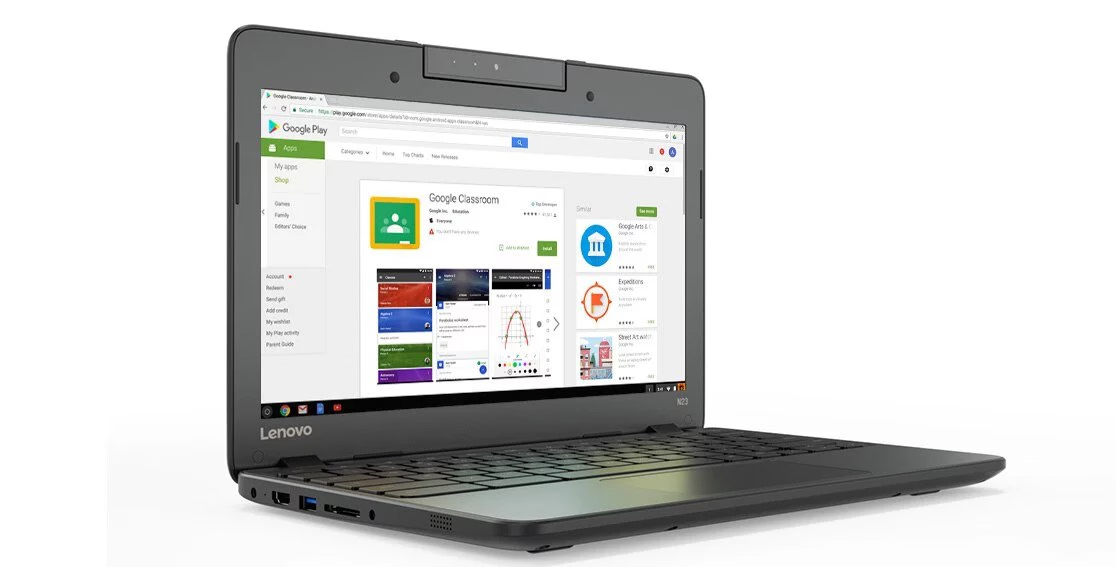
Lenovo N23 Chromebook 11.6-inch | Intel Celeron | 4GB RAM | 16GB eMMC | English Keyboard
The Lenovo N23 Chromebook 11.6-inch | Intel Celeron | 4GB RAM | 16GB eMMC | English Keyboard is a USED laptops, available on ExShopi. Key specifications include processor: Intel Celeron, RAM: 4GB, storage: 32GB. This item is sold by Fonezone and is in stock.
Price: AED 120.00 | Seller: Fonezone | Status: In stock
Product overview
<div style="font-family:Arial,Helvetica,sans-serif;color:#252a34;line-height:1.65;max-width:900px;margin:0 auto;font-size:15px;"> <h2 style="font-size:23px;line-height:1.35;color:#111827;margin:0 0 12px;"> Lenovo N23 Chromebook 11.6-inch – 4GB RAM, 16GB eMMC </h2> <p style="margin:0 0 18px;"> Discover simple, convenient everyday computing with the <strong>Lenovo N23 Chromebook</strong>. Featuring an 11.6-inch display, 4GB RAM and 16GB eMMC storage, this compact laptop is suitable for web browsing, online learning, email, document editing and other lightweight tasks using compatible ChromeOS applications. Its portable design makes it a practical choice for students, home use and everyday productivity. </p> <div style="background:#f5f7fb;border:1px solid #e5e9f0;border-radius:12px;padding:16px;margin:18px 0;"> <h3 style="font-size:17px;color:#111827;margin:0 0 12px;">Key Features</h3> <div style="display:grid;grid-template-columns:repeat(auto-fit,minmax(175px,1fr));gap:12px;"> <div style="background:#fff;border:1px solid #e8ebf0;border-radius:9px;padding:12px;"> <strong style="display:block;color:#111827;margin-bottom:4px;">11.6-inch Display</strong> <span style="font-size:13px;color:#596273;">Compact screen for browsing, studying and everyday tasks.</span> </div> <div style="background:#fff;border:1px solid #e8ebf0;border-radius:9px;padding:12px;"> <strong style="display:block;color:#111827;margin-bottom:4px;">4GB RAM</strong> <span style="font-size:13px;color:#596273;">Suitable for basic multitasking and lightweight applications.</span> </div> <div style="background:#fff;border:1px solid #e8ebf0;border-radius:9px;padding:12px;"> <strong style="display:block;color:#111827;margin-bottom:4px;">16GB eMMC</strong> <span style="font-size:13px;color:#596273;">Built-in flash storage for essential files and downloads.</span> </div> <div style="background:#fff;border:1px solid #e8ebf0;border-radius:9px;padding:12px;"> <strong style="display:block;color:#111827;margin-bottom:4px;">Portable Design</strong> <span style="font-size:13px;color:#596273;">Convenient for classrooms, travel and everyday use.</span> </div> </div> </div> <h3 style="font-size:18px;color:#111827;margin:22px 0 10px;">Practical Everyday Computing</h3> <p style="margin:0 0 14px;"> ChromeOS provides a straightforward experience for web-based tasks, online research, email and compatible productivity tools. The built-in keyboard and touchpad make it convenient for typing assignments, writing documents and browsing websites. </p> <p style="margin:0 0 16px;"> With its compact form factor and integrated graphics, the Lenovo N23 is best suited to basic computing rather than demanding gaming, intensive video editing or heavy professional software. </p> <h3 style="font-size:18px;color:#111827;margin:22px 0 10px;">Technical Specifications</h3> <div style="overflow-x:auto;border:1px solid #e1e5eb;border-radius:10px;margin-bottom:18px;"> <table style="width:100%;border-collapse:collapse;font-size:14px;min-width:260px;"> <tbody> <tr style="background:#f7f8fa;"> <td style="padding:10px 12px;width:40%;border-bottom:1px solid #e5e7eb;"><strong>Brand</strong></td> <td style="padding:10px 12px;border-bottom:1px solid #e5e7eb;">Lenovo</td> </tr> <tr> <td style="padding:10px 12px;border-bottom:1px solid #e5e7eb;"><strong>Model</strong></td> <td style="padding:10px 12px;border-bottom:1px solid #e5e7eb;">N23 Chromebook</td> </tr> <tr style="background:#f7f8fa;"> <td style="padding:10px 12px;border-bottom:1px solid #e5e7eb;"><strong>Device Type</strong></td> <td style="padding:10px 12px;border-bottom:1px solid #e5e7eb;">Chromebook laptop</td> </tr> <tr> <td style="padding:10px 12px;border-bottom:1px solid #e5e7eb;"><strong>Processor</strong></td> <td style="padding:10px 12px;border-bottom:1px solid #e5e7eb;">Intel Celeron (exact model to verify)</td> </tr> <tr style="background:#f7f8fa;"> <td style="padding:10px 12px;border-bottom:1px solid #e5e7eb;"><strong>RAM</strong></td> <td style="padding:10px 12px;border-bottom:1px solid #e5e7eb;">4GB</td> </tr> <tr> <td style="padding:10px 12px;border-bottom:1px solid #e5e7eb;"><strong>Storage</strong></td> <td style="padding:10px 12px;border-bottom:1px solid #e5e7eb;">16GB eMMC</td> </tr> <tr style="background:#f7f8fa;"> <td style="padding:10px 12px;border-bottom:1px solid #e5e7eb;"><strong>Screen Size</strong></td> <td style="padding:10px 12px;border-bottom:1px solid #e5e7eb;">11.6 inches</td> </tr> <tr> <td style="padding:10px 12px;border-bottom:1px solid #e5e7eb;"><strong>Display Type</strong></td> <td style="padding:10px 12px;border-bottom:1px solid #e5e7eb;">LED-backlit LCD (panel type to verify)</td> </tr> <tr style="background:#f7f8fa;"> <td style="padding:10px 12px;border-bottom:1px solid #e5e7eb;"><strong>Resolution</strong></td> <td style="padding:10px 12px;border-bottom:1px solid #e5e7eb;">Typically 1366 × 768 pixels; verify the unit</td> </tr> <tr> <td style="padding:10px 12px;border-bottom:1px solid #e5e7eb;"><strong>Graphics</strong></td> <td style="padding:10px 12px;border-bottom:1px solid #e5e7eb;">Integrated Intel graphics (exact model to verify)</td> </tr> <tr style="background:#f7f8fa;"> <td style="padding:10px 12px;border-bottom:1px solid #e5e7eb;"><strong>Operating System</strong></td> <td style="padding:10px 12px;border-bottom:1px solid #e5e7eb;">ChromeOS; installed version and update eligibility to verify</td> </tr> <tr> <td style="padding:10px 12px;border-bottom:1px solid #e5e7eb;"><strong>Keyboard</strong></td> <td style="padding:10px 12px;border-bottom:1px solid #e5e7eb;">English keyboard layout</td> </tr> <tr style="background:#f7f8fa;"> <td style="padding:10px 12px;border-bottom:1px solid #e5e7eb;"><strong>Graphics Type</strong></td> <td style="padding:10px 12px;border-bottom:1px solid #e5e7eb;">Integrated</td> </tr> <tr> <td style="padding:10px 12px;"><strong>Condition</strong></td> <td style="padding:10px 12px;">Enter the actual condition of the unit</td> </tr> </tbody> </table> </div> <h3 style="font-size:18px;color:#111827;margin:22px 0 8px;">Ideal For</h3> <p style="margin:0 0 16px;"> Students, online learning, web browsing, email, document editing, internet research and other lightweight everyday tasks. </p> <div style="border-left:4px solid #64748b;background:#f8fafc;padding:12px 14px;border-radius:0 8px 8px 0;margin-top:18px;"> <p style="margin:0;font-size:13px;color:#475569;"> <strong style="color:#253044;">Important Information:</strong> The Chromebook has limited 16GB storage and is designed primarily for lightweight tasks. Confirm the exact processor, ChromeOS update support, battery condition, cosmetic grade and included charger before purchase. </p> </div> </div>
Specifications
- RAM: 4GB
- Storage: 32GB
- Processor: Intel Celeron
- Condition: USED
Frequently Asked Questions
- What condition is this product in? USED
- Where does ExShopi deliver? ExShopi provides delivery across the UAE with prepaid international shipping available.
- How does delivery work? We offer Cash on Delivery in the UAE and secure prepaid delivery for international orders.
Related products
- Apple MacBook Pro 13" 2018 A1989 Core i5 2.4GHz 8GB RAM 500GB SSD Touch Bar – Space Gray
- Apple MacBook Pro 14-inch 2023 M2 Pro 10-Core CPU 16-Core GPU 16GB RAM 512GB SSD – Renewed
- Apple Apple MacBook Pro 16" (2021) - M1 Pro (10-Core CPU, 16-Core GPU), 32GB RAM, 512GB SSD - Renewed (with Original Charger)
- Apple MacBook Pro 16-inch (2019) A2141 Core i7 16GB RAM 500GB SSD Space Grey
- Dell Chromebook 3189 11.6" Student & Business Laptop – Intel Celeron, 4GB RAM, 32GB SSD, Black (Renewed)
- Dell Latitude E5470 14" Laptop - Intel Core i5-6300U, 8GB RAM, 256GB SSD, Windows 10
- Dell Latitude 7000 7320 13.3" Notebook i7-1180G7, 16GB, 512GB, Carbon Fiber detachable
- Dell Latitude 7000 7320 13.3" Notebook i7-1180G7, 16GB, 256GB, Carbon Fiber detachable
Continue browsing through homepage, matching categories, the ExShopi blog, or landing pages.